Tunnels
Port forwards you'll never retype again.
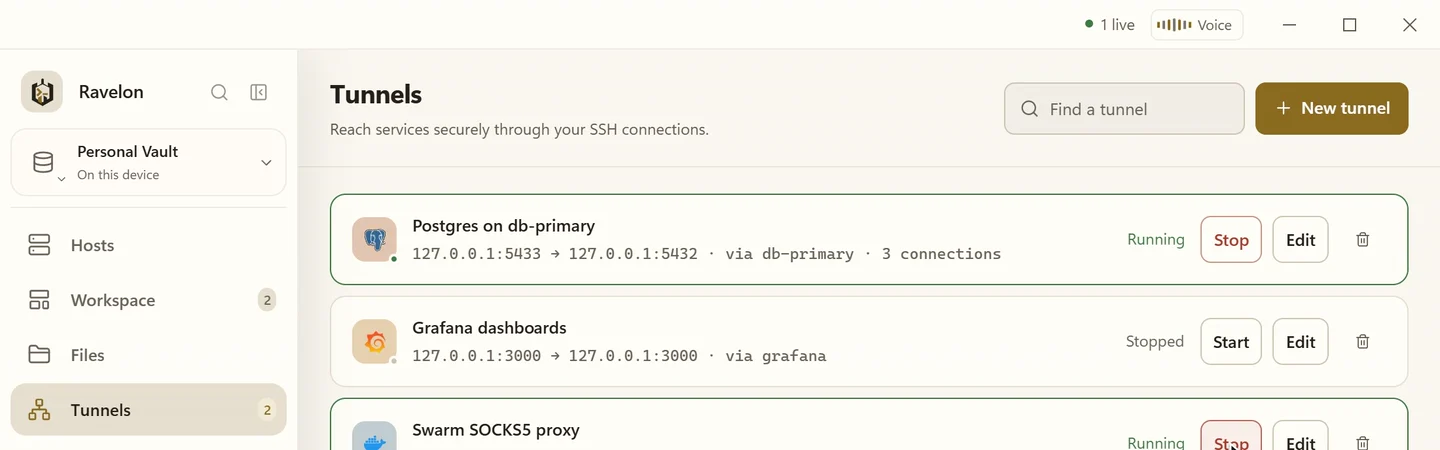
A port forward is part of how you get to a machine, not a command you type once and forget. Ravelon saves it as a rule with its host and starts it on the connection you already have open.
01
Three kinds, one list
A local forward gets you to a service that only listens on the server's loopback address, like a database. A reverse forward makes a port on your machine reachable from the remote side. A dynamic forward turns the host into a SOCKS5 proxy, so your browser can reach an internal network through it.
- Local forward (-L)
- Reverse forward (-R)
- Dynamic SOCKS5 proxy (-D)
- Can start on its own as soon as the host connects
02
One connection for all of it
Tunnels run as extra channels on the SSH connection you already logged in with. That keeps you within the session limits of a locked-down server, and a tunnel starts right away instead of going through a whole new handshake.
“Two terminals, a file browser and three tunnels to the same machine share one login.”
03
Visible while it runs
A running forward shows where it's listening, where it leads and how many connections have gone through it. Stop it from the same row, or leave it running: the status bar keeps reminding you it's there.
- Listens on loopback by default, not on every interface
- A live connection count for each forward
- Go through a jump host and forward from there
FAQ
Frequently asked questions
Is this the same as ssh -L on the command line?
It does the same thing. The difference is that the rule is saved with its host, so it outlives the session and you don't have to retype it or dig it out of your shell history.
Can a tunnel start automatically?
Yes. Mark a rule to start as soon as its host connects. Handy for that database port you always need.
Does the SOCKS5 proxy need extra software?
No. Ravelon runs the proxy itself on the port you pick. Point your browser or any other SOCKS5 client at it.
Get started
Try it in your own workspace.
On one device the desktop app is free, with nothing held back: the encrypted vault, terminal, SFTP and the assistant are all included.
What else Ravelon can do
SSH terminal
SSH with your passwords and keys kept in an encrypted vault.
VNC client
VNC with verified TLS, Apple login and an SSH tunnel when you need one.
SFTP file transfer
Move files over the same connection your terminal already uses.
iPhone & iPad
Native SSH, SFTP and local tunnels on iPhone and iPad, coming to the App Store.