AI Agents
Eight coding agents, one window.
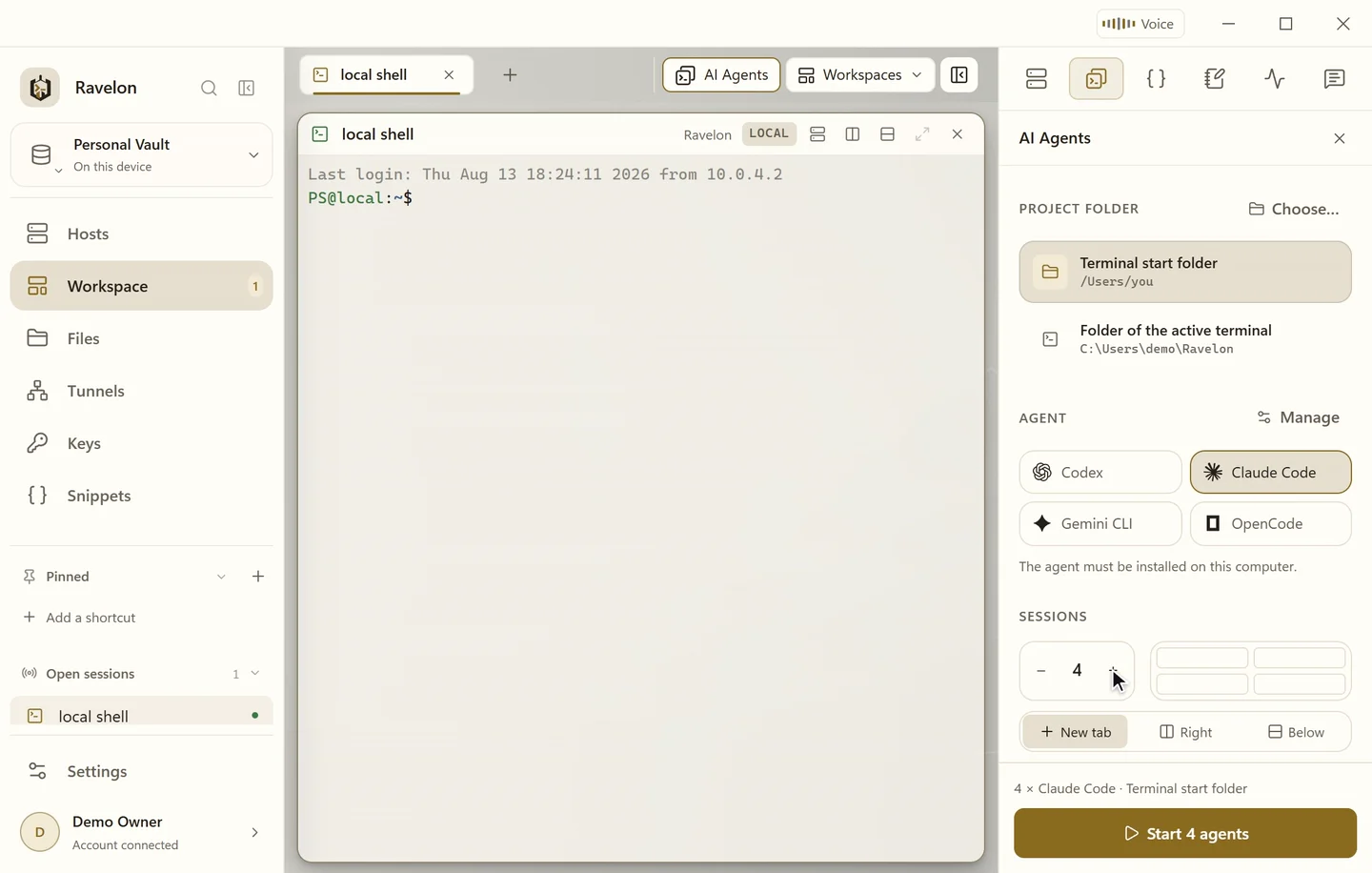
Ravelon starts the command-line agents you already use, in the project folder you pick, right next to the servers you're working on. You keep your favourite agent and your own subscription.
01
One to eight sessions at once
The launcher opens anywhere from one to eight sessions of Codex, Claude Code, Gemini CLI or OpenCode side by side, in a new tab or next to an SSH or local pane you already have open. Ravelon uses the CLI installed on your machine, with the sign-in you already have.
- Codex, Claude Code, Gemini CLI and OpenCode built in
- 1 to 8 panes per launch
- In a new tab or beside an open terminal
- Save an agent layout and reopen it like any other workspace
02
The project folder comes first
Choose the folder from the terminal's start folder, the folder of the active local terminal or your recent folders. That recent list stays on this device. If a folder has gone missing, you get one clear message before any agent starts.
“Start an agent in your home directory and it's looking at the wrong tree before it reads a single line.”
03
Your own agents and providers
Any other CLI goes in under Settings, AI providers, AI agents: the program, one argument per line, an icon and, if you like, a provider profile. You can tweak the built-in entries the same way, with your own executable, arguments and startup variables for anything that isn't a secret.
- Ravelon hands API keys straight to the agent, never by pasting them into the terminal
- If you sign in with a subscription, the CLI keeps handling that
- Codex works with Responses-compatible providers, Claude Code with Anthropic-compatible ones, OpenCode with either
- Custom definitions and provider credentials stay on this device
FAQ
Frequently asked questions
Do I need a Ravelon subscription for the agents?
No. Ravelon starts the CLI you installed and signed in to yourself. Whatever plan that tool needs is between you and the company behind it.
Which coding agents are built in?
Codex, Claude Code, Gemini CLI and OpenCode. You can add any other command-line agent as a custom agent with its own arguments and icon.
Does Ravelon send my code anywhere?
Ravelon itself keeps your code on your machine. What an agent sends follows that agent's own settings, which you control.
Is this the same as the Ravelon Agent?
No. The AI Agents launcher starts coding CLIs in local panes. The Ravelon Agent is the assistant in the sidebar: it plans server tasks and waits for your click before every step.
Get started
Try it in your own workspace.
On one device the desktop app is free, with nothing held back: the encrypted vault, terminal, SFTP and the assistant are all included.
What else Ravelon can do
Ravelon Agent
An AI agent that plans server tasks and waits for your click.
Ravelon Voice
Open panes, editors and tunnels by voice. Shell commands stay yours.
Workspaces
Shells, remote desktops and agents side by side in tabs and splits.
Snippets & palette
Commands you use over and over, with variables, one search from the terminal.