Ravelon Agent
An agent that asks before it runs anything.
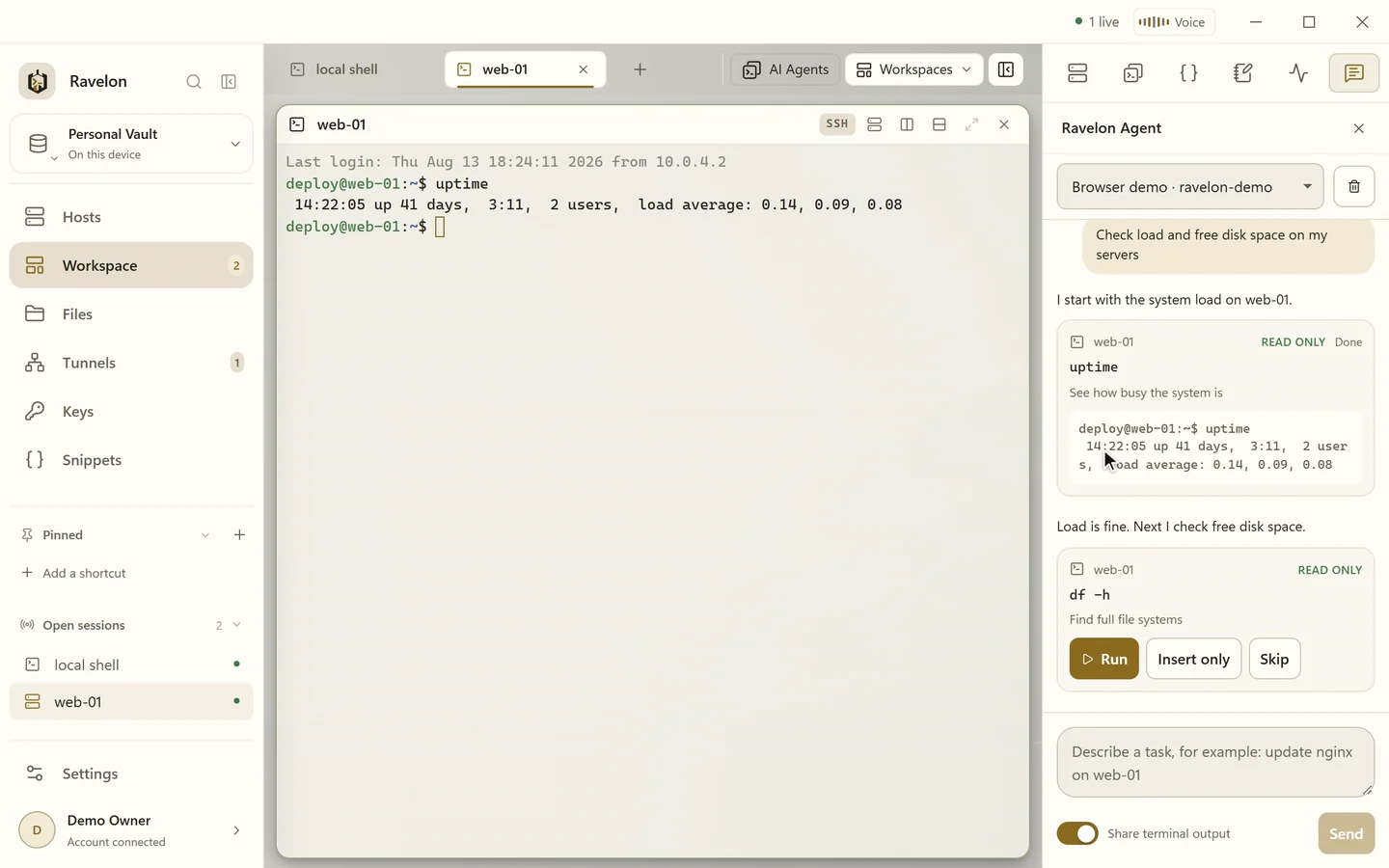
Tell it what you need, for example "check disk space on my web servers". The agent works out which hosts and commands that means, and you decide what actually runs.
01
It knows your inventory
The agent lives in the workspace sidebar and knows your saved hosts, groups, tags and open terminals. It suggests commands for one or several terminals, connects to hosts and reads the results to plan what comes next.
- Commands for one or several terminals
- Connects to saved hosts when a step needs it
- Reads the output and plans the next step
- Your conversation is kept in the encrypted vault
02
Nothing runs without you
Every step waits for your click. Ravelon classifies each command locally, and anything that could change a system needs one more confirmation: you type RUN before it's sent.
The agent never sees passwords or keys. Ravelon strips secrets out of everything it sends to your AI provider.
“Reading takes one click. Changing something means typing RUN.”
03
# suggestions and autocomplete
In any terminal, type # and describe what you're after, for example # find the largest files here. Ravelon suggests matching commands, and → or Enter puts one on the line without running it. This part needs an AI provider.
Autocomplete doesn't. It draws on your encrypted local history, snippets, command specs and paths and shows the best match as grey text after the cursor.
- → accepts a suggestion, Tab stays with your shell
- Pauses at password, passphrase, OTP and PIN prompts
- Anything that looks like a secret stays out of the history
- Understands bash, zsh, fish, PowerShell and cmd prompts
FAQ
Frequently asked questions
Can the Ravelon Agent run commands on its own?
No. Every step needs your click, and commands that could change a system also need you to type RUN.
Which AI model does it use?
Whichever AI provider profile you set up in Ravelon's settings: the OpenAI or Anthropic API, a compatible or local endpoint, or your Codex or Claude Code subscription. You choose the model, and your provider credentials stay on your device.
Does a # suggestion run the command?
No. The command lands at the prompt and waits for you to press Enter.
Can AI features be switched off?
Yes. Without an AI provider they simply stay inactive, and admins can turn off AI, the Ravelon Agent and # suggestions for a whole machine with a policy file.
Get started
Try it in your own workspace.
On one device the desktop app is free, with nothing held back: the encrypted vault, terminal, SFTP and the assistant are all included.
What else Ravelon can do
Autocomplete & AI help
Grey-text suggestions from your history, # commands and Ask AI on any output.
Ravelon Voice
Open panes, editors and tunnels by voice. Shell commands stay yours.
AI Agents launcher
One to eight Codex, Claude Code, Gemini CLI or OpenCode panes, opened in your project folder.
Many hosts at once
Type into every pane at once, run one command on several hosts, keep big lists tidy.