RealVNC alternative
RealVNC alternative with VNC, RDP and SSH
Ravelon connects to VNC servers in the same tabs as your RDP and SSH hosts, on Windows, macOS and Linux. Choose verified TLS or send the session through a saved SSH host, and keep every host in an encrypted vault.
RealVNC is a commercial VNC remote access product with a free viewer and subscription plans for RealVNC Connect. We at Ravelon wrote this page and keep it up to date. RealVNC is a trademark of its owner.
Ravelon compared with RealVNC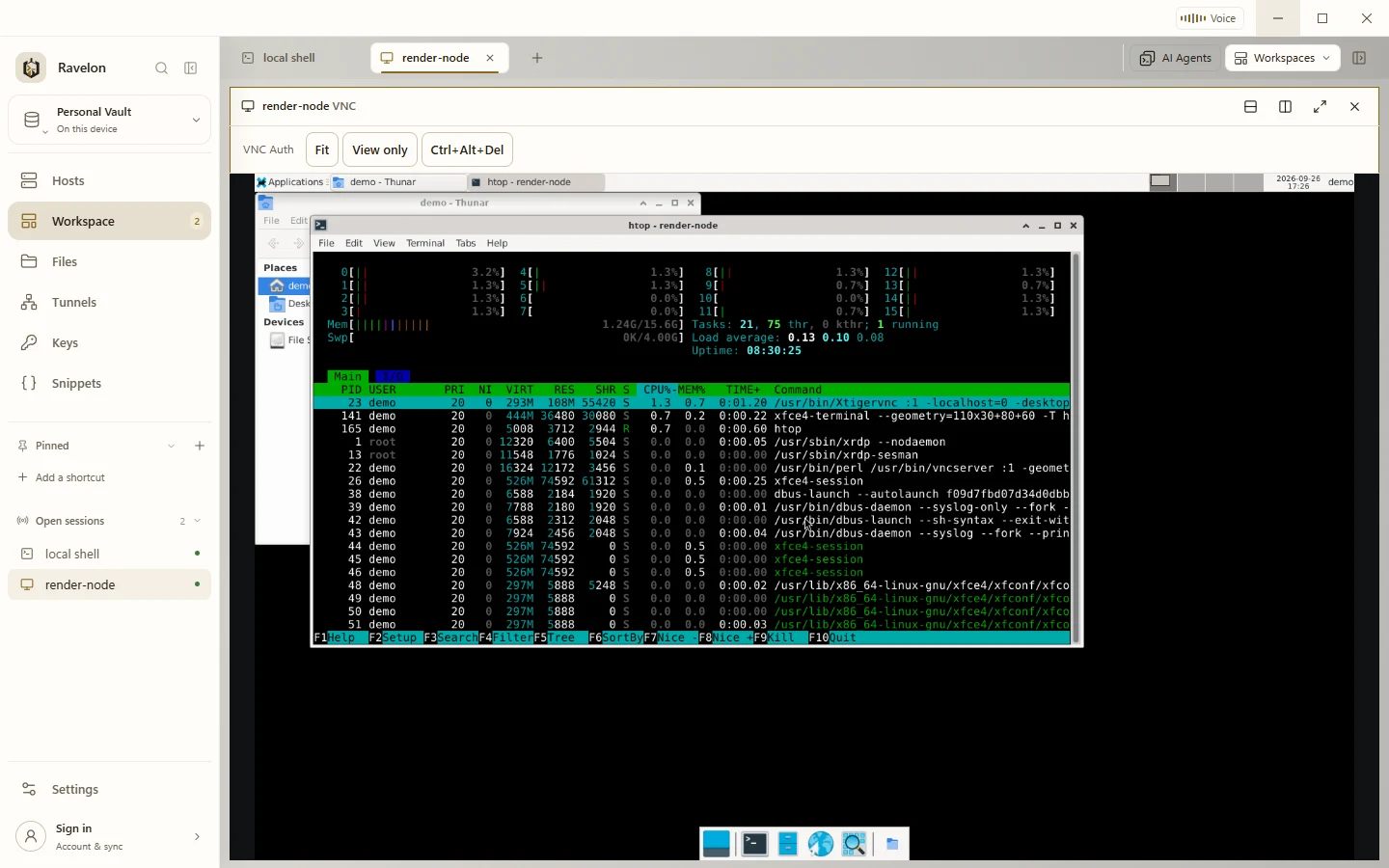
At a glance
- Protocols
- SSH, SFTP, RDP, VNC, Telnet and serial console
- Systems
- Windows, macOS and Linux
- Licence
- One-time purchase, no subscription
- Price
- Free without sync, Pro with sync €49.90 once
- Sync
- End-to-end encrypted. We host it, or you do.
Ravelon and RealVNC, side by side
| Compared | Ravelon | RealVNC |
|---|---|---|
| Pricing | Free without sync. Pro is EUR 49.90 once and adds sync. The self-hosted sync server is free and open source. | Free viewer; RealVNC Connect plans are subscriptions. |
| Platforms | Windows, macOS and Linux, on x86_64 and ARM64, with .deb and .rpm packages for Linux. | Windows, macOS, Linux, Raspberry Pi, iOS and Android. |
| VNC security | Verified TLS (VeNCrypt X.509), anonymous TLS, Apple Remote Desktop and classic VNC, optionally through an SSH tunnel. | RealVNC's own encryption between RealVNC Viewer and RealVNC Server. |
| Other protocols | SSH, SFTP, tunnels, RDP, Telnet, serial consoles and local shells in the same app. | Built for VNC remote access, with cloud connections through a RealVNC account. |
| Hosts and credentials | Encrypted vault (AES-256-GCM) on your device. Sync only sees encrypted data. | An address book in the viewer, synced through the RealVNC account when you sign in. |
RealVNC column last checked: 2026-10
Sources for RealVNC: RealVNC Viewer download, RealVNC: connecting from other VNC viewers, RealVNC connection encryption
Product fit
Ravelon or RealVNC?
Stay with RealVNC if
- You reach computers behind firewalls through RealVNC's cloud service, without opening ports or running SSH.
- You need RealVNC's own encryption between RealVNC Viewer and RealVNC Server.
- You need remote access from an Android device.
Ravelon limitations
- RealVNC's own encryption and cloud connections are not supported. Ravelon reaches RealVNC Server with a VNC password, best through an SSH tunnel.
- SASL, RSA-AES and client certificate authentication are not available for VNC.
- There is no Android app. Ravelon runs on Windows, macOS and Linux; the iPhone and iPad app supports SSH, SFTP, local tunnels and snippets.
Ravelon features
Four reasons to move from RealVNC to Ravelon
01
Verified TLS
VNC connects with verified TLS (VeNCrypt X.509, TLS 1.2 or newer) and an optional certificate authority of your own.
02
Tunnel through SSH
For servers without TLS, pick a saved SSH host and Ravelon tunnels the VNC session through it, with that host's keys and jump hosts.
03
One window for every screen
VNC, RDP and SSH share tabs and split panes. Fit or 1:1 scaling, fullscreen, view-only mode and Ctrl+Alt+Delete are built in.
04
No subscription
The desktop app is free without sync. Pro adds end-to-end encrypted sync for EUR 49.90 once.
VNC in the workspace
VNC sessions open in tabs and split panes next to SSH terminals and RDP desktops, and a saved workspace brings the whole layout back.
- Fit to the pane or 1:1, plus fullscreen
- View-only mode and Ctrl+Alt+Delete
- Clipboard exchange you turn on when you need it
- Apple Remote Desktop for Macs
Hosts in an encrypted vault
VNC settings travel inside the encrypted host record, so they sync with everything else through Ravelon Cloud or your own server.
The server stores records it can't read.
Switching
RealVNC migration
Add your VNC servers as hosts in Ravelon, one by one or as a CSV list with vnc in the protocol column. Pick a security mode per host: verified TLS where the server offers it, otherwise classic VNC through a saved SSH host.
Ravelon connects to RealVNC Server once it allows connections from other VNC viewers with a VNC password. Reach it through an SSH tunnel so the session is encrypted on the way.
Install Ravelon
Download the build for your system from the download page. The local desktop app is free. Pro adds cloud sync and Ravelon ID.
Add your VNC servers
Create a VNC host for each server, or import a CSV list with vnc in the protocol column.
Choose the security mode
Use verified TLS where the server offers it. Otherwise pick classic VNC and a saved SSH host to tunnel through.
Add passwords and keys to the vault
Standard file imports leave out passwords. Add them to the vault once. To sync them to your other devices, turn on Sync keys & identities.
FAQ
Frequently asked questions
Can Ravelon connect to RealVNC Server?
Yes, once RealVNC Server allows connections from other VNC viewers with a VNC password. Tunnel the session through a saved SSH host so it stays encrypted on the way.
Which VNC servers connect with verified TLS?
Servers that offer VeNCrypt with X.509 certificates, such as TigerVNC. Macs connect through Apple Remote Desktop, best tunnelled through SSH.
What does Ravelon cost?
The desktop app is free without sync. Pro adds end-to-end encrypted sync through Ravelon Cloud for EUR 49.90 once. Running your own sync server is free.
Try it first
Try it on your own servers.
Try the free desktop app with its encrypted vault, SFTP, RDP, VNC and assistant. Import your SSH config and use Ravelon alongside your current client.
Other comparisons
Termius alternative
Free local tools with optional one-time Pro cloud sync.
Warp alternative
Your servers, files and tunnels in one workspace, with AI that waits for your OK.
PuTTY alternative
Your PuTTY sessions in one window, with a vault and a file browser.
MobaXterm alternative
The session-plus-files workflow you know, on macOS and Linux too.
Tabby alternative
Vault, files, tunnels and sync in one app, ready from first launch.
SecureCRT alternative
Free local connections with optional one-time Pro cloud sync.
Termix alternative
A native desktop app with a local vault, ready to go without any server setup.
Royal TS alternative
SSH first, with RDP and VNC alongside, on Linux too.
Remmina alternative
RDP and VNC right next to your SSH work, on Windows and macOS too.
Remote Desktop Manager alternative
RDP, VNC and SSH in one window, free locally and Pro paid once.
mRemoteNG alternative
Your tabbed connections on macOS and Linux too, with an encrypted vault.
Conductor alternative
Parallel coding agents in worktrees, on Windows, macOS and Linux.